Video Summarizer and research tool

Top 5 Best Video Summarizer Free And Paid

NoteGPT Review: Is This A Effective AI-Powered Research and Note-Taking Tool Managing Information Overload with AI We’re living in an age where information comes at us from every direction, faster than ever before. Whether you’re a student, an entrepreneur researching your market, or a content creator like myself, trying to keep up with everything can feel overwhelming. That’s where AI tools comes in. In this article I want to share my experience with NoteGPT, a specialized tool designed to help you summarize content, research and generate notes. ...

October 22, 2025 · James Woo
Shotcut - cloud based AI speech to text

Key Features in Shotcut Video Editor Version 25.05.11

Shotcut video editor continues to evolve, offering useful key updates in the latest version 25.05.11. This update introduces 7 major features and 3 minor enhancements, improving efficiency and creativity for video editors. Let’s explore these new tools. Alpha Strobe Effect: Adding a Dynamic Flashing Effect One of the standout features in Shotcut is the Alpha Strobe effect, designed to create a pulsating strobe motion on text or video elements. BTo use this, you want to apply the Alpha Strobe filter and adjusting its interval settings. ...

June 13, 2025 · James Woo
DemoCreator - cloud based AI speech to text

DemoCreator Screenrecorder Review And Key Features

Whether you’re an educator, content creator or business professional, using a screen recorder is one of the fastest and easiest ways to create engaging videos. One such tool that stands out is DemoCreator from Wondershare. This article will provide a quick review of DemoCreator, covering its key features, usability, and pricing. Key Features DemoCreator is packed with features that simplify video creation. As a screen recording, it can do all the basics like record the entire screen, specific sections and/or webcam and your cursor. These are recorded on separate tracks to enable editing. ...

June 5, 2025 · James Woo
Filmora - cloud based AI speech to text

9 Easy Effective AI Powered Video Editing Tricks Using Filmora

9 creative way to use AI and make your videos stand out Using Filmora. Video editing can be time-consuming, but with Filmora’s powerful tools, you can enhance your videos efficiently. In this articles, you will learn nine creative ways to make your videos more engaging using Filmora’s features. Protect Skins Tones While Using LUTs Changing the overall color tone of your video with Lookup Table (LUT) is easy. Filmora offers preset LUTs that you can apply with just a few clicks. To maintain natural skin tones, use the Protect Skin Tones feature and adjust the slider accordingly, ensuring a balanced and natural look without wasting time. ...

May 3, 2025 · James Woo
Shotcut AI speech to text

Shotcut Speech To Text With Whisper AI

Shotcut v24.10.29 is integrated with Whisper AI Speech to Text. This means that you can now generate subtitles for your project easily for free. With Whisper AI, it can also do translation. Take note though the the translation is one way as in original language to English. It doesn’t do English to a different language. Using it is simple. In the Subtitle tab, click on Detect language. Select the language and choose whether you want to include non verbal words like ‘aahs’ and ‘um’. Click on Ok and wait for the subtitles to be generated. ...

November 9, 2024 · James Woo
RecCloud - cloud based AI speech to text

RecCloud AI Speech To Text With AI Polishing?

RecCloud is a web based tool that can help you with creating, sumarizing, and editing videos. Here’s a brief over view of RecCloud with tools that I feel standout. These tools are based on present development and I’m sure they will improve over time. You can test it for yourself and there’s a link at the bottom of the article. Using the tool is straight forward. AI Speech To Text This is a key feature at this time. RecCloud can transcribe speech to text. This is nothing spectacular. However it has an ace up its sleeve. RecCloud can polish or edit the created text to remove fluff, unnecessary um and ahhs, wrong pronunciation and etc. ...

October 29, 2024 · James Woo
New Features in Filmora 14

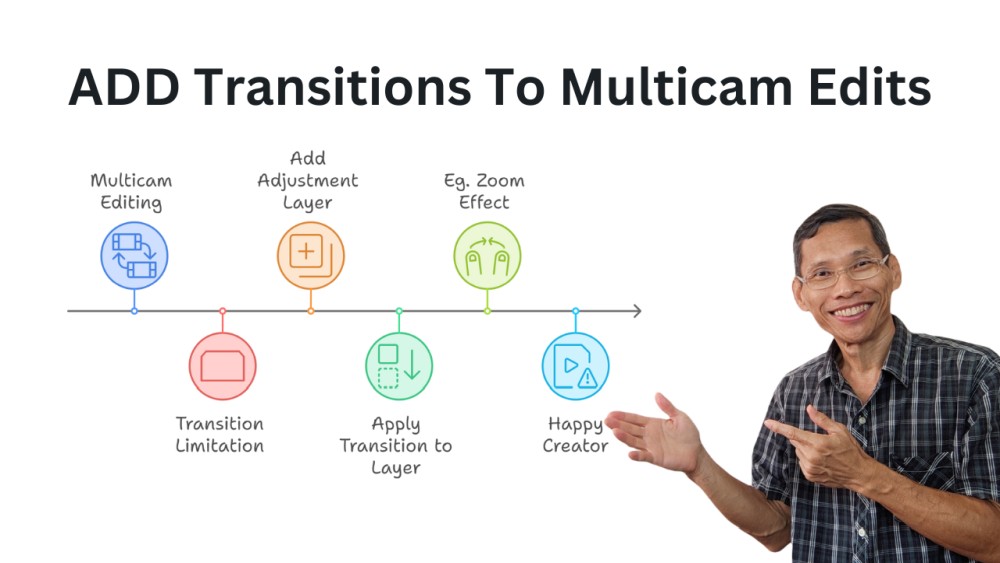
Adding Transitions To Multicam Edits In Filmora 14

Multicam editing is very good feature in Filmora 14. It allows you to switch quickly between multiple camera angles when you edit. If you are not sure how multicam works, then read this article here. One thing though, at this point, Filmora 14 doesn’t support adding transitions directly between multicam clips. If you want to enhance your video by adding transitions such as dissolves or fades, you are stuck. Howeve, I found a workaround which is to add an adjustment layer between two clips, and apply transitions to the layer. The above steps shows you how to do it in a graphical form. ...

October 10, 2024 · James Woo
New Features in Filmora 14

Everything You Need To Know In Filmora 14

Filmora 14 just launched and here’s everything you need to know. These are the features I’ll go through in this article. If you prefer a video review, click here to skip down to the bottom of this article. Filmora AI Copilot Filmora’s AI Copilot helps with giving suggestions and tips to get a certain results. For example, if you want to have a fast, modern transition, instead of just suggesting a transition, you may get tips like adding a speed ramp and other ways to get the result. ...

September 29, 2024 · James Woo
Gling Ai video editing

Faster Editing. Better Videos With Gling AI

AI or artificial intelligence is helping make video editing much faster and better. Anyone who has ever made a video knows it takes a substantial amount of time to edit a video. Just to remove bad takes, bloopers, mistakes, tongue twisters takes time for a video editor to go through and get a rough cut. What if you have an assistant editor that can do all that before you start touching the clips? ...

September 10, 2024 · James Woo
Filmora AI Object removal

AI Object Removal In Filmora 13

The AI Object Removal tool in Filmora 13 is great for removing objects or people you don’t want in your video. It usually works quite well if the background isn’t busy and the object you want to remove is stationary. However for certain situations or scene, it can be challenging for the AI to remove certain objects. I show you what to do in case you get the “failure to remove” message. ...

July 20, 2024 · James Woo