Whether you’re an educator, content creator or business professional, using a screen recorder is one of the fastest and easiest ways to create engaging videos. One such tool that stands out is DemoCreator from Wondershare.
This article will provide a quick review of DemoCreator, covering its key features, usability, and pricing.
Key Features
DemoCreator is packed with features that simplify video creation.
As a screen recording, it can do all the basics like record the entire screen, specific sections and/or webcam and your cursor. These are recorded on separate tracks to enable editing.
The annotation tools are really good and you can add highlights and on-screen notes while recording or in editing. This can save you so much time.
Teleprompter With AI Assistant
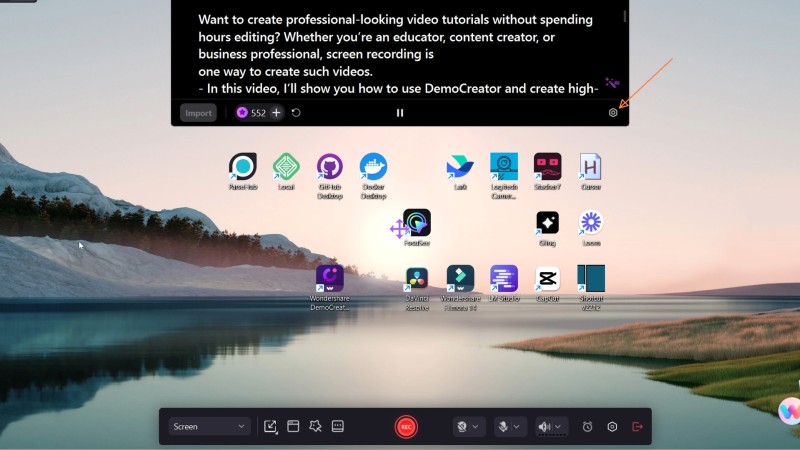
While trying out the teleprompter feature, I found that I make a lot less mistakes having spend a bit more time preplanning what I want to say.
The AI assistant also help rephase words and sentences to make it smoother.
AI Background Removal
The other feature I liked a lot is that DemoCreator as AI background removal so if you don’t have a greenscreen or forgot to use one, you can still have a remove your background. This is great because otherwise, it mean having to redo your entire recording.
Recording Options

When you launch DemoCreator, you have the option to choose the Recorder or the Editor module. Besides the usual recording like screen, webcam or audio, you have the option to use a virtual avatar. Very useful if you are not dressed properly or have a good room to record in.
Auto Pan Zoom

You also have the option to turn on auto zooming. With this turned on, DemoCreator will automatically pan and zoom around as you record. It allows you to automatically highlight sections you want your audience to pay attention to. This feature saves so much time vs manually editing in post production.
Editing and Post-Processing
Once the recording is complete, DemoCreator offers an advanced editing interface, allowing you to trim and split the video into sections.
You can edit and adjust webcam footage on a different track with effect like fade in and out, zoom and etc. You can also refine and edit the pan and zoom to suit your audience.

There are also text annotations, arrows, and freehand drawings to enhance your video should you want to use them. It is easy to use much like creating a presentation rather and editing a video since it is just drag and drop, then adjusting the size.
DemoCreator also simplifies subtitle creation with auto-transcription, making content more accessible for viewers who want to watch your video on silent.
Audio Enhancements
The software includes a suite of tools for refining audio quality including background noise reduction, voice cleaning features, hum and hiss reduction.
These tools ensure clear audio, especially beneficial for tutorial and educational content.
Exporting

DemoCreator provides various export options, including customizable frame rates and high-quality output settings. You can also create a thumbnail using editable templates.
I found that it is quite helpful when I’m out of ideas to create a thumbnail for YouTube. The image you see above was made using the template in DemoCreator.
Pricing
There are several plans to choose from. The quarterly plan cost $19.90 per quarter while the annual plan is $29.90 a year. There is also a perpectual plan but do note the terms of the plan.
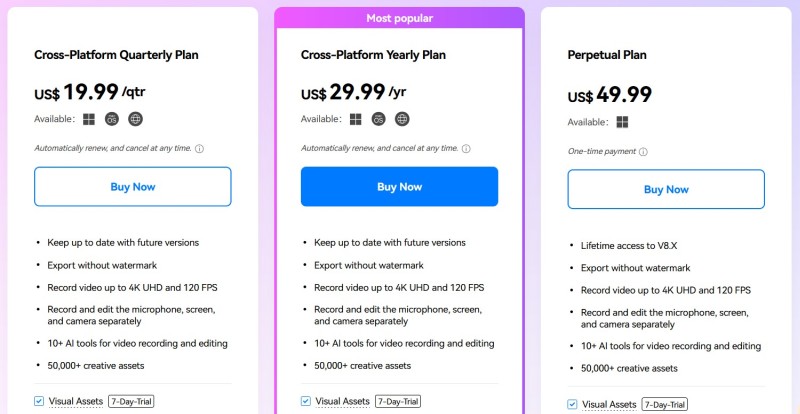
Each plan includes different levels of AI credits, which are used for advanced AI-powered features such as auto subtitles and virtual avatars.
Price wise, it is a good alternative to say Camtasia which cost a lot more.
Video Review
Prefer a video review? Here’s a video review of DemoCreator tools mentioned above
Related Videos
7 Must Know DemoCreator features to help you be more effective.
10 Tips To Maximise DemoCreator
Conclusion
DemoCreator is a versatile tool for effortless screen recording and content creation. Its AI-powered features, flexible editing tools, and affordability make it a strong choice for educators, content creators, and professionals.
If you’re looking for an intuitive way to produce high-quality tutorials and presentations, DemoCreator is worth exploring.
Click on this link to download and try DemoCreator!