Shotcut video editor continues to evolve, offering useful key updates in the latest version 25.05.11. This update introduces 7 major features and 3 minor enhancements, improving efficiency and creativity for video editors.
Let’s explore these new tools.
Alpha Strobe Effect: Adding a Dynamic Flashing Effect
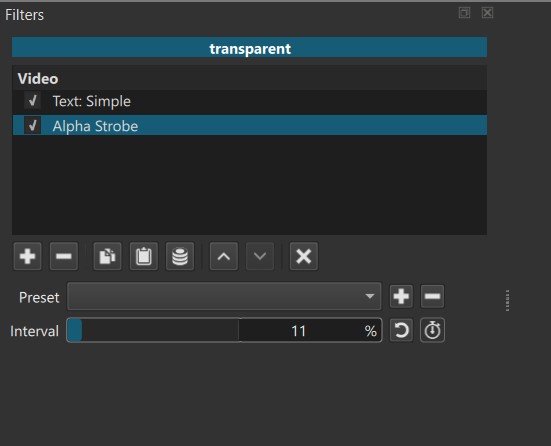
One of the standout features in Shotcut is the Alpha Strobe effect, designed to create a pulsating strobe motion on text or video elements. BTo use this, you want to apply the Alpha Strobe filter and adjusting its interval settings.
It is fast and simple to use and great for editors to enhance the visuals with a rhythmic flashing effect. You can use Keyframes with this filter so it gives you even more creative flexibility.
Freeze Frame: Capturing the Perfect Still Image
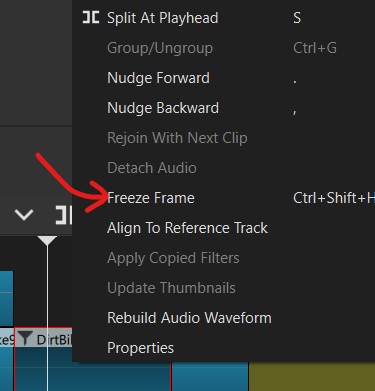
This new Freeze Frame function simplifies the process of freezing a moment in a video clip. Instead of capturing a frame manually and then importing it into Shotcut, you just:-
- select a clip you want to add a freeze frame,
- move the playhead to the desired position,
- right-click on the clip and choose Freeze Frame to generate a static image.
You can then adjust the duration like a standard video clip and add transitions if you like.
Playlist Counter : A Small but Useful Update
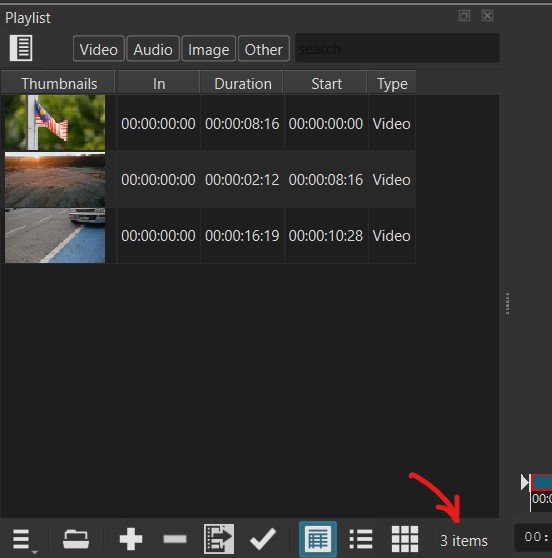
This is a minor improvement to Shotcut’s playlist feature. You can now easily know how many items is in the Playlist with a counter. Not that big a deal when you have a handful of media in the Playlist, but if you have several hundred images, then it can help to keep count.
New Generator Menu: Faster Asset Creation
Shotcut streamlines its menu system with a New Generator menu. It makes it easier to create things like color bars, text overlays and other other visual elements.
Previously placed under the File menu, this New Generator menu improves efficiency and makes asset creation more intuitive.
Run Re-analysis Option
For filters that requires Shotcut to do any form of analysis for example, the Stabilize filter, you now have an option to re-run analysis when you make changes to the filter.
If you use the Stabilize filter, there are parameters you can set. If you adjust the shakiness more, just change the setting and click on the Rerun Filter Analysis to refine stabilization without generating multiple analysis files.
Edit-Friendly File Conversion Update
Shotcut now provides clearer prompts when converting files into an Edit-Friendly format. You can see the warning about file size depending on the option you select.
Expanded Preview Scaling for High-Resolution Editing
Preview scaling has been upgraded, now supporting up to 1080p. This helps if you are working with 4K footage and lower resolution monitor, allowing for smoother playback while maintaining quality.
Improved Blur & Mosaic Filtering for Compositing
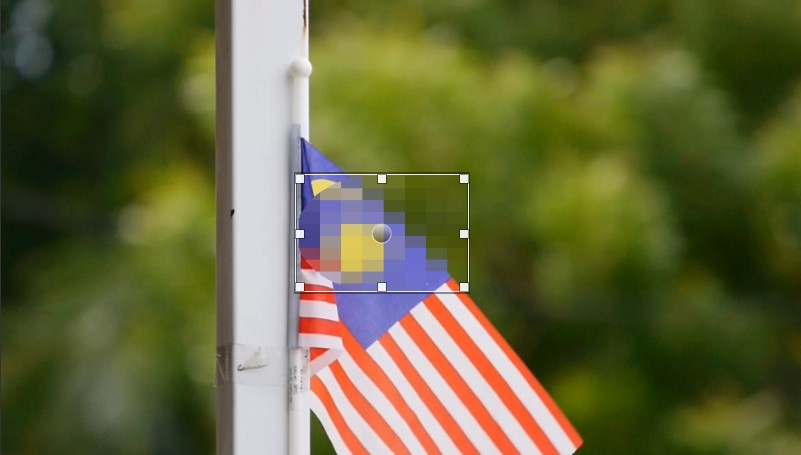
The Obscure Blur & Mosaic Filter has been refined to improve detail masking, making it easier to conceal specific elements in a video.
Final Thoughts: Why These Changes Matter
The latest updates in Shotcut video editor improve *workflow efficiency. Although some of the changes are minor, all the changes make Shotcut better than ever.
Video Tutorial
If you’re new to Shotcut or want to master its features quickly, consider checking out the official training course .